NOP Watch Party
Watch YouTube and Netflix with friends in sync, with video calls and a mic that mutes itself.
Chrome on desktopFree for guests · hosts get 30 free minutes a day, or a paid plan
Open this on a computer
NOP Watch Party needs Chrome on desktop. Send yourself the link to install it there.
Overview
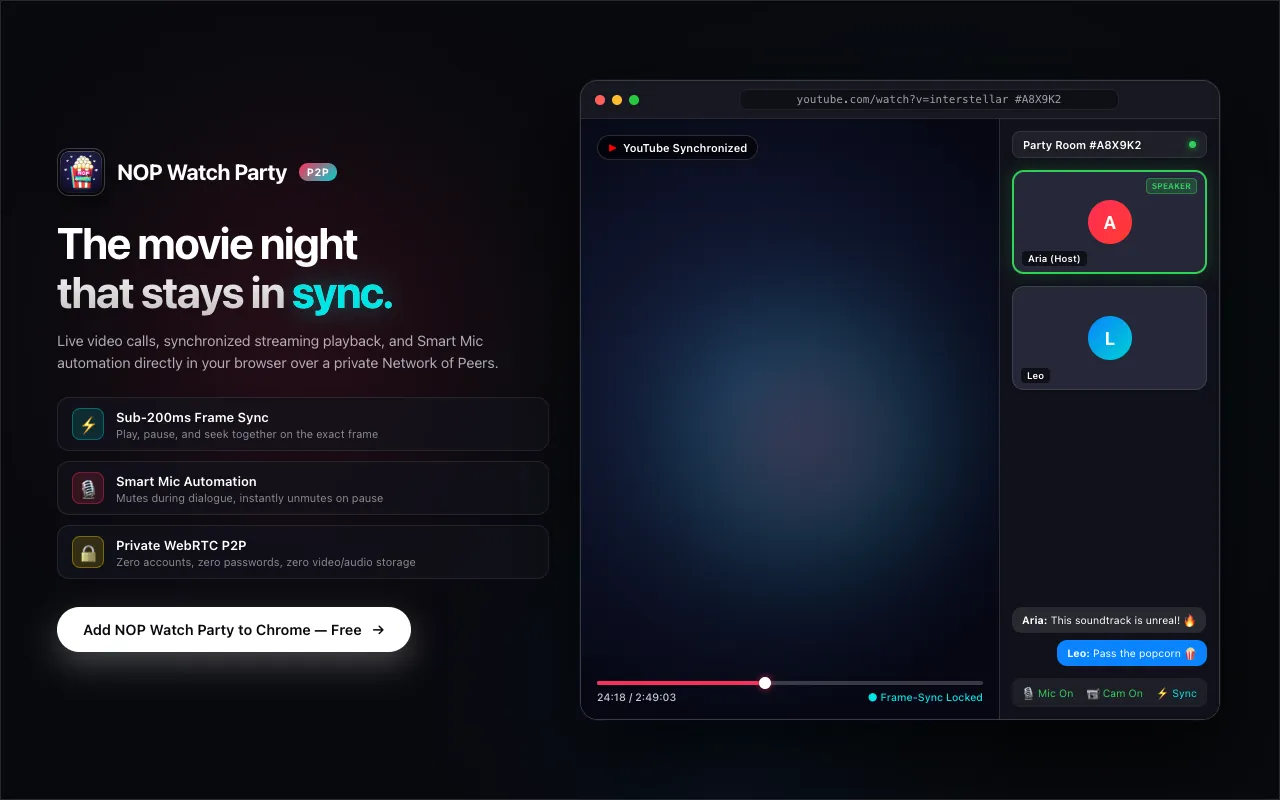
NOP Watch Party is a Chrome extension for watching films and shows together from different places. Everyone plays the video in their own browser, and the extension keeps play, pause, seek and speed in sync, with video calls and chat docked beside the player.
There are no accounts. You open a video, create a room, and send the link. Calls, audio and sync signals go directly between browsers over encrypted WebRTC, so no video or audio is stored on a server.
Works with
| Platform | What syncs | Status |
|---|---|---|
| YouTube | Playback, ad holds, playlists | Fully supported |
| Netflix | Scrubbing, auto-follow to the next episode | Fully supported |
| Amazon Prime Video | Playback, commercial breaks | Still being tested |
| JioHotstar | Playback controls, sports, multi-language streams | Still being tested |
Each person needs their own account for paid services like Netflix or Prime Video. The extension syncs timing and calls; it never sends the video itself, so there are no screen-share black screens and everyone gets full quality.
How to use
- Open a video in Chrome on YouTube, Netflix, Prime Video or JioHotstar. A small NOP pill appears in the top-right corner.
- Create a room and share the link (or PIN) on WhatsApp, Discord or iMessage.
- Watch together. When friends open the link, they join your room. If they don’t have the extension yet, the invite page offers a one-click install and then takes them straight to the party.
What it does
- Synced playback, with ad holds
Play, pause, seek and speed changes reach everyone within about 200ms. If someone hits an ad or buffers, the party waits until everyone catches up.
- Smart Mic
While the video plays, microphones are muted so speaker sound doesn’t echo back. Pause, and mics open again so you can talk, with no mute button to find.
- Docked or cinema layout
Docked mode shrinks the player so subtitles are never covered by video tiles. Cinema mode floats everything over the film. The panel is isolated from the page, so typing in chat never triggers the player’s keyboard shortcuts.
- No accounts, peer-to-peer
No email, password or watch history. Each room gets a temporary ID, and media flows directly between browsers.
Pricing
Guests are always free. Only the person hosting the room needs a trial or a plan.
| Plan | Price | People | Time |
|---|---|---|---|
| Host daily trial | Free | 2 (host + 1) | 30 minutes a day |
| Host Duo | $14.99 once | 2 (host + 1) | Unlimited |
| Host Squad | $24.99 once | Up to 12 | Unlimited |
| Monthly Squad Pass | $2.99 a month | Up to 12 | Unlimited |
Prices as listed on nop.akhilv.com on 20 November 2026. Check there for the latest.
Questions
Does everyone need their own Netflix or Prime Video account?
Yes. Each person signs in to their own account in their own browser. NOP Watch Party only syncs timing, controls and calls; it doesn’t send video over the network.
How does Smart Mic stop echo?
Laptop speakers usually leak back into the microphone. The extension watches the player: while the video plays, your mic is muted; the moment it pauses, your mic is live again.
What if a friend doesn’t have the extension?
The invite link opens a small bridge page. It checks for the extension, offers a one-click install from the Chrome Web Store, and then takes them straight into your room.
Is it free for guests?
Yes. Guests never pay, sign up, or hit a time limit. Only hosts use the daily trial or a plan.
NOP Watch Party is an independent product and is not affiliated with, endorsed by, or sponsored by Netflix, YouTube, Google, Amazon Prime Video or Disney+ Hotstar. Product names and brands belong to their owners.